
Price reduction negotiation process

① Search for products
Use the category menu or narrow your search to select the item you want to negotiate a price reduction on.

② Inquiry about discount
Please send us your desired price using the inquiry form on the product page.

③Negotiations
We will contact you to let you know whether we can purchase the item at your desired price.
*Please note that we may not be able to accommodate your request.

④ Coupon issued when negotiations are concluded
Once the negotiation is successful, we will email you a coupon code that will reduce the price to the agreed amount.

⑤Purchase using a coupon
You can order at the agreed amount.
Notes on price negotiations
- Coupons issued when a price reduction is agreed upon cannot be used in conjunction with other sales or coupons.
- If multiple items are negotiated, please use the coupon for each item and complete the purchase process.
- The coupon issued when the price reduction negotiation is successful will be sent by email to the email address you entered in the inquiry form when negotiating the price reduction.
- Each coupon has an expiration date.
- The item will continue to be on sale on the website even during price negotiations. Other customers may purchase the item or negotiate for a lower price during the negotiation.
For detailed screen operations, please see below.
- How to inquire about a discount
- Example of price negotiation input
- How to use coupons
- How to check the discount amount
How to inquire about a discount
- For price negotiation inquiries, please use the inquiry button on each product page.
(We do not accept orders over the phone)
Example of price negotiation input
- Please enter your desired purchase amount, such as " I would like to negotiate the price down. Please reduce it to XXX million yen, " and then submit.
How to use coupons
- Enter the coupon code at checkout to apply the discount.
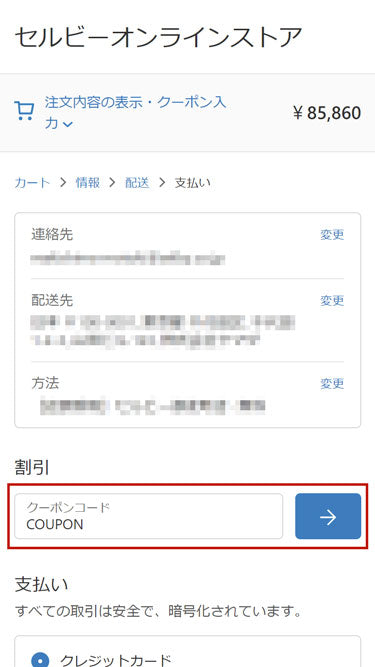
- You will need to use the coupon yourself when placing your order.
- If you place an order without using a coupon, we cannot generally adjust the price after the order has been placed.
- If you enter two coupon codes at the same time, the larger one will be applied .
How to check the discount amount
- Please check the order confirmation screen to confirm that the price has been discounted to the final amount.